A Link Passed Along: Read the Route Before the Claim
Check a shared news link’s source and wording so you can tell whether its caption reflects the report, an update or only a partial account.
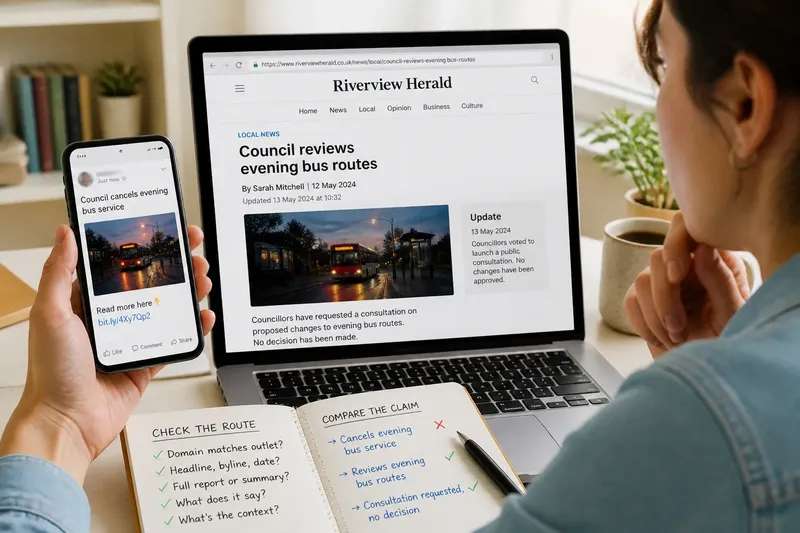
A post says a council has cancelled a local service, but its link opens on a page with a different headline. To check a shared news link, trace who published it and what the page actually establishes. A mismatch may have a mundane explanation, but it is a reason to inspect the route rather than repeat the caption.
Why does the link open somewhere unexpected?
A tap may lead to an app, a subscription screen, a shortened address or a page that looks different from the one described in the post. That does not, by itself, mean the link is deceptive. Apps and platforms may redirect links to apply tracking, open their own reader or send visitors to a regional version.
Check the address shown after the page loads. Does its domain belong to the news organisation named in the caption, or to a platform that republishes or summarises its work? Look for the publication name in the page header, the article title and the byline. A logo alone is weak evidence: it may be part of an advert, a search preview or a copied image.
If the address is shortened, use the platform’s link preview or open it in a browser where you can inspect the destination. Avoid entering passwords or personal details on an unfamiliar page. If the destination remains unclear, search the exact headline on the publication’s own site or in a general search engine, then compare the address and page details.
How can you identify the source page?
“Source page” can mean several things. A news organisation may have published the article; another site may have syndicated it with permission; an aggregator may have linked to it; or a later page may quote only part of it. Those are different routes, even when the wording is similar.
Look for a publication name, an author or newsroom byline, a publication date and a page containing the full report rather than a short extract. A syndication note or source link may explain why the text appears elsewhere. If the caption names one outlet but the page credits another, follow the credit before deciding what the post refers to.
Search a distinctive headline in quotation marks, or pair an exact phrase from the article with the publication’s name. Compare the headline, byline and date on candidate pages. Similar wording does not establish that two pages are the same version; a later update may have changed the headline or the report’s scope.
What can you establish when a page changes?
News pages can be updated, corrected, moved behind a subscription wall or removed. A broken link does not tell you what the page said when it was shared. A current page may also differ from the version described by the caption.
Look for a publication date, an update notice, a correction or an editor’s note. Search the outlet’s site for the earlier headline, or consult a reputable archive if one is available. An archived copy may preserve an earlier page while omitting later corrections, embedded material or context from the live version.
Say the post reads, “Council cancels evening bus service,” and links to a report now headed “Council reviews evening bus routes”. The update note says councillors have requested a consultation, not approved a cancellation. You search the outlet’s site for the original headline, compare the update note and the relevant passage, then find that the caption turns a request for consultation into a settled decision. The observable result is a clear mismatch in wording and status; the post alone does not establish that the service has been cancelled.
How do you compare the caption with the report?
Instead of relying on the headline, identify the passage or document the caption appears to describe. Check the sentence that supports it and the sentences around it, then note who is making the claim. A report may attribute a statement to a resident, official or organisation without endorsing it as established fact.
Compare the caption’s verbs and certainty with the report’s. If it says “confirmed”, identify who confirmed the point and what the article cites. If it says “banned”, check whether the report describes a rule already in force, a proposal, a temporary restriction or a possible future action.
Then look for what the report itself distinguishes: an allegation from a finding, a plan from a decision, or a decision from its implementation. A post may quote a real sentence yet omit a qualification nearby. The relevant comparison is between the caption and the report’s account, not between the caption and one striking phrase taken alone.
What else do readers ask about shared news links?
Why does a search result show a different headline?
Search previews can retain an older headline or display text written for the page description. Open the page and compare its current headline, date and body before relying on the preview.
What if the shared link points to an aggregator?
Check whether the aggregator names the original outlet and links to its full report. If it gives only a summary, use the named publication and headline to locate the source page rather than treating the summary as the original reporting.
Can a caption be accurate after the report has changed?
Possibly, but the current page may no longer support it in the same way. Compare the caption’s date and wording with any update notice, and look for an earlier version if the difference affects the claim.
What if the article is behind a paywall?
Use the visible headline, byline, date and accessible summary to identify the publication, but do not infer unseen details from the preview. Look for a free version from the same outlet or a direct statement of the relevant information, and be clear about what you could not read.
What should you check before sharing the link?
Use the observations to decide what to do next, rather than treating every check as a pass or fail:
- Check the destination domain and the publication named on the page; if they match, continue to the report, but if they do not, follow the source credit or find the named outlet’s page.
- Check the full headline, byline and publication or update date; if they identify the report described in the post, compare its wording, but if they do not, search the outlet’s site for the title or a distinctive phrase.
- Check whether the page is a full report, a syndicated copy or an aggregator summary; if it links to the source, follow that link, but if it does not, locate the original outlet before attributing claims to it.
- Check the passage that supports the caption and the surrounding sentences; if they preserve the same qualification, you can describe that limited claim, but if they alter its meaning, quote the fuller context or do not share the caption as written.
- Check whether the report describes an event, a proposal, an allegation or an unresolved account; if its status matches the caption, keep that wording, but if it differs, state the report’s status or hold off sharing.
- Check whether the caption’s certainty and time frame match the report; if they do, the caption may fairly describe that part of the report, but if they do not, soften the wording or link directly without endorsing the caption.
- Check for an update, correction or earlier version; if a relevant change explains the mismatch, mention it, but if the earlier wording cannot be verified, say that the page’s history is unclear.
When you cannot establish the route, say so plainly or leave the link unshared. Checking a shared news link cannot settle every claim in a report; it can show whether a caption gives the source more certainty than its wording supports. Pass along the source and its limits, not merely the sentence that travelled ahead of it.